---
sidebar_position: 3
---
# Single Message Transform (SMT's)
## Intro
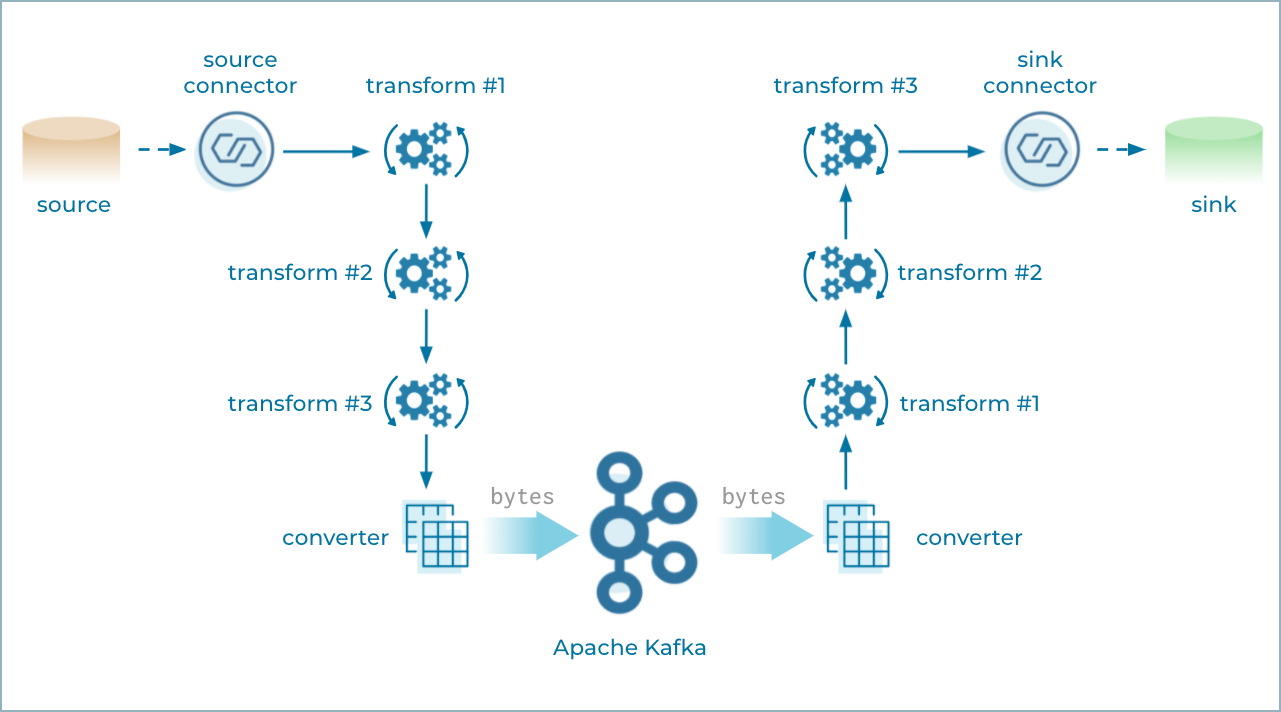
Single Message Transformations (SMTs) are applied to messages as they flow through Connect.
SMTs transform inbound messages after a source connector has produced them, but before they are written to Kafka.
SMTs transform outbound messages before they are sent to a sink connector.
These are some of the built in SMTs that are available [here](https://docs.confluent.io/platform/current/connect/transforms/overview.html).
You can use multiple SMTs together to perform a more complex transformations. SMTs are chained together.
Transformations can also be configured with [predicates](https://docs.confluent.io/platform/current/connect/transforms/filter-ak.html#predicates) so that the transformation is applied only to records which satisfy a condition
 ### Adding built in SMTs to a connector
These need to be added to your connectors configuration file (config.template.json). This is the basic syntax:
```
"transforms": "renameFirstTopic",
"transforms.renameFirstTopic.type": "org.apache.kafka.connect.transforms.RegexRouter",
"transforms.renameFirstTopic.regex": ".*",
"transforms.renameFirstTopic.replacement": "mysql_table_name",
OR
"transforms": "CamelTypeConverterTransformer",
"transforms.CamelTypeConverterTransformer.type": "org.apache.camel.kafkaconnector.transforms.CamelTypeConverterTransform$Value",
"transforms.CamelTypeConverterTransformer.target.type": "java.lang.String"
```
### Using 3rd party SMTs which are on confluent hub
We also use 3rd party SMT from [jcustenborder/kafka-connect-transform-common](https://github.com/jcustenborder/kafka-connect-transform-common)
Eg: https://github.com/theorchard/kafka-connect/tree/master/debezium_mysql_source/plugins
:::info[Note]
Even though we use Jcustenborder SMT in lot of places, it is not frequently updated and has lot of open security vulnerabilities and startup errors in log.
You can read more about the issue with debezium_mysql_source connector here: https://github.com/theorchard/kafka-connect/blob/master/debezium_mysql_source/README.md#connector-upgrade
:::
For this you need to
1. Install it from confluent hub which copies it to `/usr/share/confluent-hub-components/` path.
```
RUN confluent-hub install --no-prompt jcustenborder/kafka-connect-transform-common:${TRANSFORM_COMMON_VERSION}
```
2. Add the path to ENV CONNECT_PLUGIN_PATH
```
ENV CONNECT_PLUGIN_PATH='/usr/share/java,/usr/share/connect-plugins,/usr/share/confluent-hub-components/'
```
3. Use it in config.template.json
```
"transforms": "changeTopicCase",
"transforms.changeTopicCase.type": "com.github.jcustenborder.kafka.connect.transform.common.ChangeTopicCase",
"transforms.changeTopicCase.from": "LOWER_UNDERSCORE",
"transforms.changeTopicCase.to": "LOWER_CAMEL",
```
### Using custom SMTs which we created.
**1. Create a custom SMT plugin.**
You can reuse the template provided by https://github.com/cjmatta/kafka-connect-insert-uuid and update it to build your custom class.
Our class should extend `extends ConnectRecord> implements Transformation`. See full [example here](https://github.com/cjmatta/kafka-connect-insert-uuid/compare/master...aonamrata:kafka-connect-insert-uuid:GetCDCPayload).
**2. Build the plugin jar.**
Configure your pom.xml to have your class name and correct version in case you are updating a released package.
```
com.github.pde.kafka.connect.smt
GetCDCPayload
1.0
```
and then run `mvn install`. It will build the pacakge in `./target/` folder.
**3. Put the plugin in your kafka connector and configure it.**
Copy the .jar package that was generated in target folder to the docker container of the kafka-connector that wants to use it. Eg: https://github.com/theorchard/kafka-connect/pull/1193/files
Once you have the package in docker, you can use it in config.template.json
```
"transforms" : "changeoperation",
"transforms.insertuuid.type": "com.github.pde.kafka.connect.smt.ChangeOperation$Value",
"transforms.insertuuid.uuid.field.value": "created",
```
##### Debugging custom SMT.
Since this is our custom SMT so we can add logs in java plugin using the slf4j.LoggerFactory with different log levels like:
```
logger.trace("ChangeOperation: configured fieldValue=" + fieldValue);
logger.info("ChangeOperation: applySchemaless");
```
and set the connector to that log level using
```
ENV CONNECT_LOG4J_ROOT_LOGLEVEL="TRACE"
```
### Adding built in SMTs to a connector
These need to be added to your connectors configuration file (config.template.json). This is the basic syntax:
```
"transforms": "renameFirstTopic",
"transforms.renameFirstTopic.type": "org.apache.kafka.connect.transforms.RegexRouter",
"transforms.renameFirstTopic.regex": ".*",
"transforms.renameFirstTopic.replacement": "mysql_table_name",
OR
"transforms": "CamelTypeConverterTransformer",
"transforms.CamelTypeConverterTransformer.type": "org.apache.camel.kafkaconnector.transforms.CamelTypeConverterTransform$Value",
"transforms.CamelTypeConverterTransformer.target.type": "java.lang.String"
```
### Using 3rd party SMTs which are on confluent hub
We also use 3rd party SMT from [jcustenborder/kafka-connect-transform-common](https://github.com/jcustenborder/kafka-connect-transform-common)
Eg: https://github.com/theorchard/kafka-connect/tree/master/debezium_mysql_source/plugins
:::info[Note]
Even though we use Jcustenborder SMT in lot of places, it is not frequently updated and has lot of open security vulnerabilities and startup errors in log.
You can read more about the issue with debezium_mysql_source connector here: https://github.com/theorchard/kafka-connect/blob/master/debezium_mysql_source/README.md#connector-upgrade
:::
For this you need to
1. Install it from confluent hub which copies it to `/usr/share/confluent-hub-components/` path.
```
RUN confluent-hub install --no-prompt jcustenborder/kafka-connect-transform-common:${TRANSFORM_COMMON_VERSION}
```
2. Add the path to ENV CONNECT_PLUGIN_PATH
```
ENV CONNECT_PLUGIN_PATH='/usr/share/java,/usr/share/connect-plugins,/usr/share/confluent-hub-components/'
```
3. Use it in config.template.json
```
"transforms": "changeTopicCase",
"transforms.changeTopicCase.type": "com.github.jcustenborder.kafka.connect.transform.common.ChangeTopicCase",
"transforms.changeTopicCase.from": "LOWER_UNDERSCORE",
"transforms.changeTopicCase.to": "LOWER_CAMEL",
```
### Using custom SMTs which we created.
**1. Create a custom SMT plugin.**
You can reuse the template provided by https://github.com/cjmatta/kafka-connect-insert-uuid and update it to build your custom class.
Our class should extend `extends ConnectRecord> implements Transformation`. See full [example here](https://github.com/cjmatta/kafka-connect-insert-uuid/compare/master...aonamrata:kafka-connect-insert-uuid:GetCDCPayload).
**2. Build the plugin jar.**
Configure your pom.xml to have your class name and correct version in case you are updating a released package.
```
com.github.pde.kafka.connect.smt
GetCDCPayload
1.0
```
and then run `mvn install`. It will build the pacakge in `./target/` folder.
**3. Put the plugin in your kafka connector and configure it.**
Copy the .jar package that was generated in target folder to the docker container of the kafka-connector that wants to use it. Eg: https://github.com/theorchard/kafka-connect/pull/1193/files
Once you have the package in docker, you can use it in config.template.json
```
"transforms" : "changeoperation",
"transforms.insertuuid.type": "com.github.pde.kafka.connect.smt.ChangeOperation$Value",
"transforms.insertuuid.uuid.field.value": "created",
```
##### Debugging custom SMT.
Since this is our custom SMT so we can add logs in java plugin using the slf4j.LoggerFactory with different log levels like:
```
logger.trace("ChangeOperation: configured fieldValue=" + fieldValue);
logger.info("ChangeOperation: applySchemaless");
```
and set the connector to that log level using
```
ENV CONNECT_LOG4J_ROOT_LOGLEVEL="TRACE"
```